Every hour counted, in the year it belongs to.
Class attendance, sign-offs and approved study add up per learner, from their own start date, toward what your agency or accreditor requires. The report comes out in the agency’s own columns.
Registered apprenticeship: RTI per apprenticeship year from each apprentice’s registration date, on-the-job hours signed off by the sponsor, and prior RTI transferred in with the reason. Federal rules recommend 144 RTI hours a year; your registered standards set the number.
Allied health and clinical programs: hours split into direct and indirect with the site and supervisor, procedure counts, and preceptor sign-offs.
CTE, workforce and continuing education: work-based learning, contact hours, CEUs, OSHA Outreach and WIOA participant hours.
Verified hours, hours waiting for approval and study time stay three separate numbers, and only verified hours count.
Learners who are behind this year, or short in an earlier one, are flagged while there is still time to schedule catch-up.
An instructor contact report per course: when an instructor last reached each learner and how, live minutes from the video call log, and a flag when someone goes quiet or a question waits.
Exports in the agency’s own upload layout, a signed record for each learner as a page or PDF, and a read-only link for the agency with names left off.
See it work
Hours & Progress, on real screens.
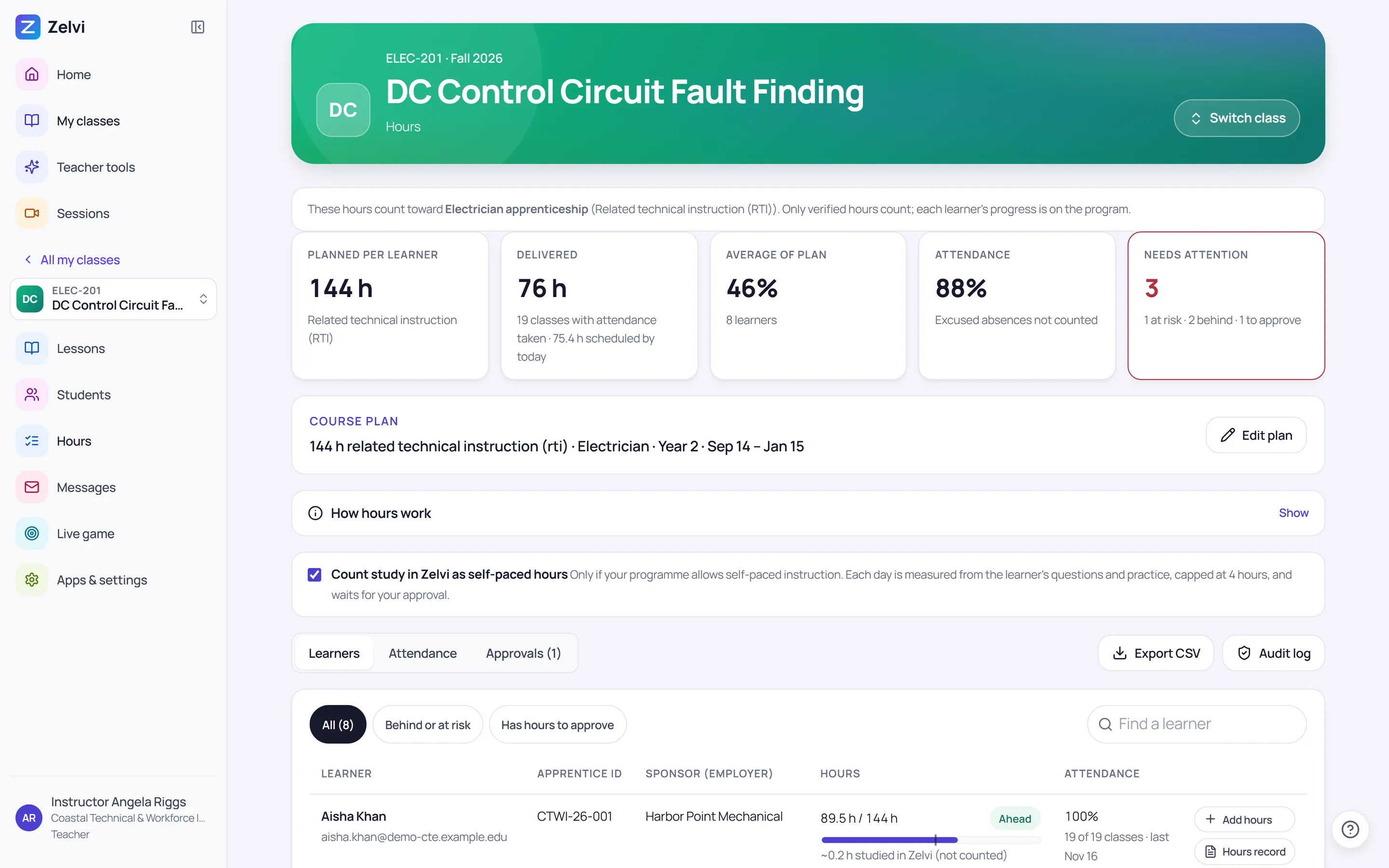
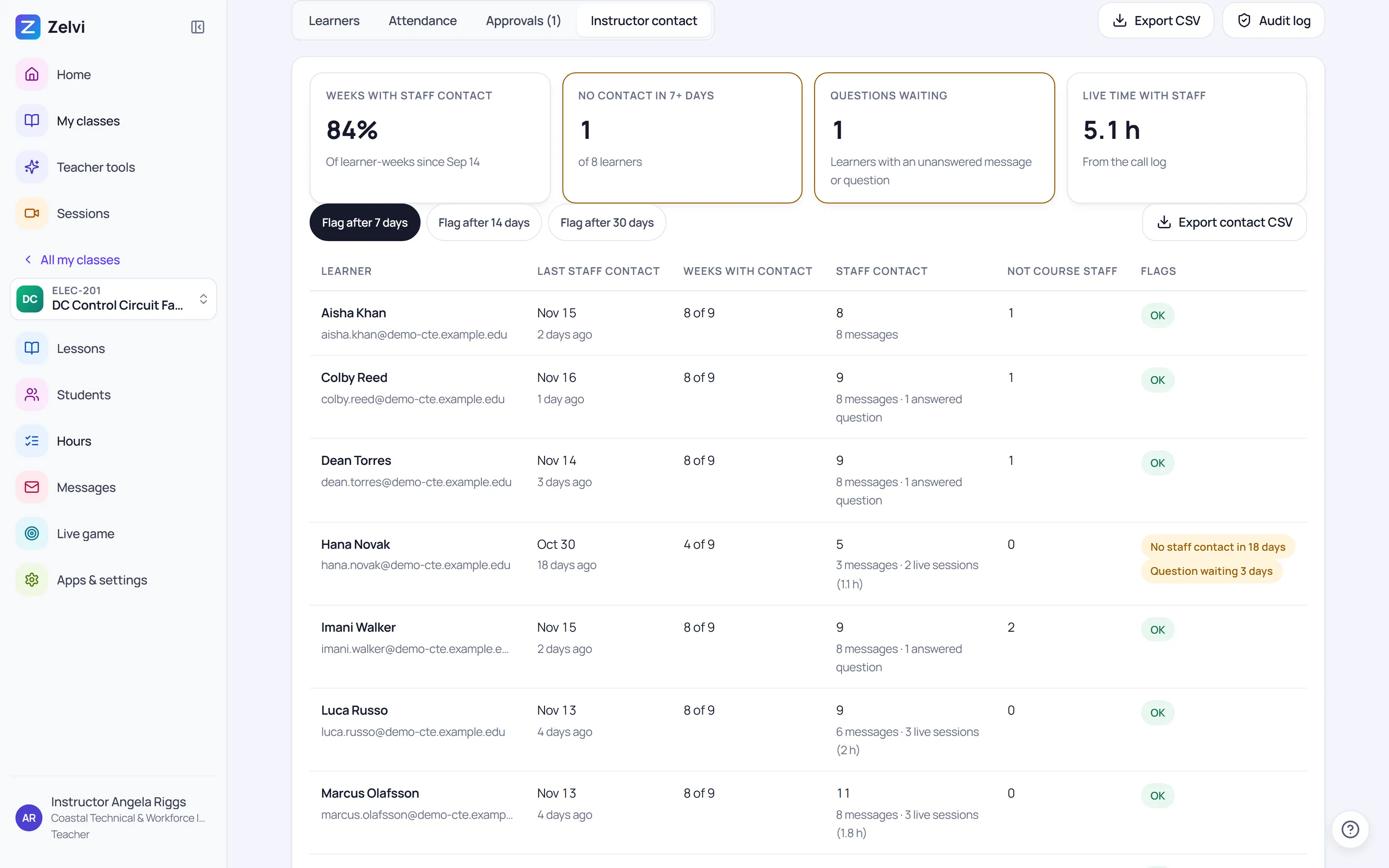
A 55-second walkthrough of real Zelvi screens on a demo institution:
- An RTI class keeps its register in Zelvi: attendance, check-in and instructor sign-off
- Hours delivered against the plan, attendance, and who needs attention
- Instructor contact between classes: messages, answered questions, marked work and live time from the video call log
- An apprentice no instructor has reached in 18 days, with a question waiting, is flagged
- The program adds up every course that counts toward RTI
- Each apprentice against their own year, from their registration date: RTI toward 144 h, OJT toward 2,000 h
- Behind this year, or short in an earlier one, flagged while there is time to catch up
- Year by year: required, counted and what is still due
- On-the-job hours, signed off month by month by the sponsor’s journeyworker
- Year-1 RTI from a college transcript, transferred in with the reason. Nothing can be edited afterwards
- Sponsors sign from an emailed link, with no account. Each link works once
- The apprentice sees the same numbers, and can ask their sponsor to sign
- Exports from the same numbers: RAPIDS-style, cohort by sponsor or region, WIOA
- Match the agency’s own upload template once: its headings, its order, its date format
- Every quarter after that, the file comes out in that layout, ready to upload
- A signed progress record for each apprentice, as a page or a PDF
- Or give the agency a read-only link: IDs instead of names, an expiry date, every view logged
Real product screens on a demo institution. The learners and their work are synthetic.
What this rests on
- Hours recorded where they happen: class registers with check-in, instructor sign-offs, hours a learner reports and staff approve, and study in Zelvi only where the program allows itVerified hours, hours waiting for approval and study time are three separate numbers, and only verified hours count. A correction is added as a new entry instead of overwriting the old one, and every change is in the audit log.
- Progress toward what an agency or accreditor requires, counted from each learner’s own start date: RTI hours per apprenticeship year, on-the-job hours, clinical hours and procedure counts, contact hours or CEUsHours from every course that counts are added up per learner, and transfers, waivers and corrections are recorded with the reason. Seventeen starting templates, from registered apprenticeship and CTE programs of study to CNA, phlebotomy, OSHA Outreach, WIOA and licence renewal, each name where their numbers come from and ask you to confirm them.
- Sponsors, supervisors and preceptors sign off hours and skills from an emailed link, without an accountEach link works once and expires after 14 days. The signer’s name, role and the time are kept with the record, and a sign-off cannot be edited afterwards.
- Reports in the agency’s own format: RAPIDS-style apprenticeship progress, Perkins V, WIOA, NRS, last date of attendance and cohort summaries, plus a signed record for each learner as a page or a PDFPaste the heading row of an agency’s upload template once and Zelvi lines up the columns, the date style and the separator, so each quarter’s file needs no hand editing. An agency can also get a read-only link that shows IDs instead of names, expires, and logs every view.
- A record of instructor contact with each learner: when course staff last reached them, in how many weeks, and how, with a flag when a learner goes quiet or a question is left waitingCounts the messages instructors send, the questions they answer, the work they mark and the live sessions where the video call log shows instructor and learner together, with the minutes. Tutors are counted separately, the AI tutor never counts, and no message text is read. Exports as CSV.
- Each institution’s data is isolated at the database level, not by application codeThe database itself refuses to return another institution’s rows, whatever the application asks for.
The rest of the platform
- Zelvi tutorA tutor that knows which course it is teaching.
- Visual CanvasShow the idea. Then let them move it.
- Curriculum GroundingYour material, with the edges marked.
- Practice & AssessmentThe model observes. The rubric decides.
- Live Class QuizzesThe quiz ends. The learning doesn’t.
- AnalyticsA zero can mean two opposite things.
- Zelvi for ChromeYour next lesson is the page you are already on.
- Sign-in & RosteringStudents and staff appear in the right classes. Nobody types a roster.
- Student safetyAn AI tutor that knows when to stop tutoring.
- AI GatewayOne model going down is not an outage.